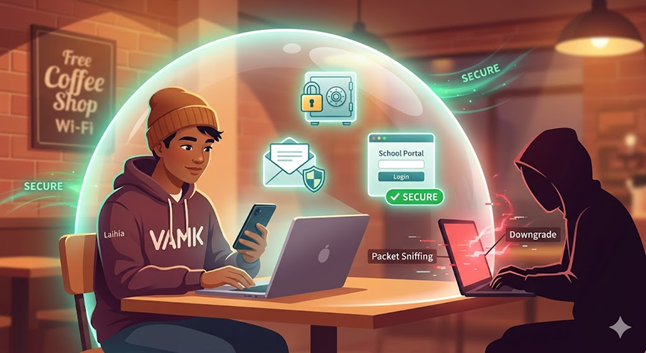
Most of us love getting some work done while sitting in a cozy cafe or waiting for a flight at the airport. It feels completely normal and convenient to jump on the free internet just to check messages or scroll through social media. Still, that “Free Wi-Fi” sign might be hiding some serious digital dangers that we usually ignore.
What Is Public Wi-Fi?
Public Wi-Fi refers to internet networks you find in common places like malls, hotels, school libraries, cafes, airports and even on trains or buses. These are often “open” networks, which means they either don’t require a password at all or they share one simple password with every customer. Because anyone can connect, they are much less secure than your private home network.
Think of it like shouting your messages across a crowded room, everyone nearby can hear. There is usually no strong encryption, so your data travels pretty much unprotected. Public Wi-Fi is super convenient when you’re out, but the network itself doesn’t really protect you.
What If Something Goes Wrong?
When you use these networks, you are sharing the digital space with strangers, and some of them might be hackers. A criminal can sit nearby and run a “man-in-the-middle” attack to watch everything you do online, almost like they are looking over your shoulder. They can even create fake Wi-Fi hotspots with names that look official, like “Free Cafe Wi-Fi,” to trick you into connecting so they can steal passwords or bank details. In some cases, just connecting to a bad network lets malware sneak onto your phone or laptop.
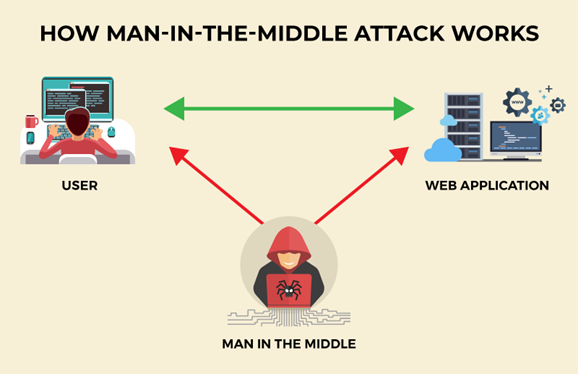
Recent cybersecurity reports show that nearly 43 % of people who use public Wi-Fi have experienced some kind of data breach, with man-in-the-middle attacks and packet sniffing as the most common threats (The Network Installers, 2025). In some cases, attackers can even use techniques such as SSL stripping to downgrade a secure HTTPS connection to plain HTTP, making encryption ineffective. These threats are real and happen every day in busy public places.
How Does This Affect Students and Everyday Users?
This is a big deal for students because we often rely on campus hotspots or library Wi-Fi to study and submit assignments. If a hacker gets into your connection, they could steal your school login, access your personal emails, or even find private data like your home address or student loan information.
ven if free Wi‑Fi is used only occasionally—for example when mobile data runs out or no other internet connection is available—the risks remain exactly the same. Many students do the same when mobile data runs out or the home connection is bad. For the larger population it’s the same story: people use public Wi-Fi for banking, shopping or checking important emails while travelling or working outside the office. One bad connection can lead to identity theft or financial loss that affects your whole life.
How Can You Benefit Safely from Public Wi-Fi?
To stay safe while using public Wi‑Fi, following basic information security recommendations is essential. The tips below are based on guidance provided by Traficom, the Finnish Transport and Communications Agency (Traficom, n.d.).
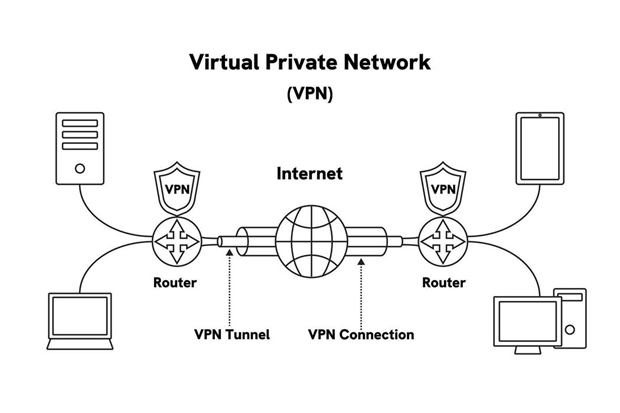
- Use a VPN: A Virtual Private Network acts like a “secret tunnel” that encrypts your data so hackers cannot see it. This process is illustrated in Figure 2.
- Avoid sensitive accounts: Never check your bank balance or log into important school systems while on public Wi-Fi.
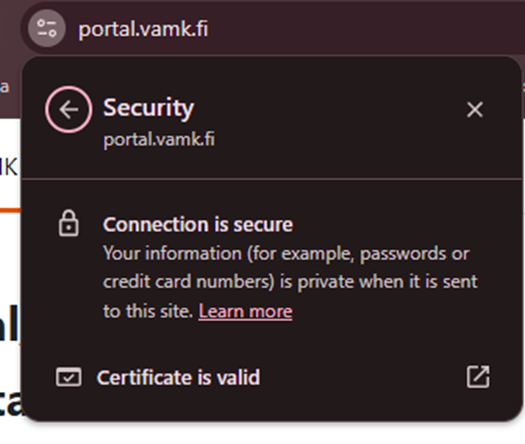
- Look for HTTPS: Only visit websites that have a padlock icon in the address bar, which shows the site is using a secure connection. For example, when you log into your school portal (portal.vamk.fi), you should see a clear message that the connection is secure, as shown in Figure 3.
- Turn off auto-connect: Change your settings so your phone does not automatically join open networks without your permission.
- Keep your device updated: Always install the latest software updates because they often fix security holes that hackers use.
- Use a good antivirus: A basic one can help block malware that tries to sneak in through the network.
These small steps turn public Wi-Fi from a risky habit into a safe and useful tool. You can still get your work done in the cafe or top up your phone credit without worrying.
In conclusion, public Wi-Fi is a helpful tool, but it is not a “magic wall” that protects your privacy. Being proactive and informed is the best way to keep your personal data safe in a world that is always connected. It only takes a few seconds to check your settings before you click “connect.”